
Frequently Asked Questions
Printing tips and troubleshooting.
Our benchcard paper is a polyester blend with a waterproof coating. To maximize the color images that print on our benchcards, hangtags, and potlabels; you will need to print with a color laser printer. Any color laser printer will work with our paper. The toner has the greatest impact on the UV resistance. The printer we HIGHLY reccommend is the HP Color Laser Jet Pro as it has fantastic UV resistance and works very well with all of our blank bench card, hangtag and pot label stock.
♦ NOTE: Inkjet printers will NOT work with any of our blank sign material.
A color laser printer is required to print pot labels. Check with your manufacturer to ensure you have the settings adjusted properly for labels before printing.
If you are looking to purchase a new printer, we highly recommend the HP Color LaserJet Pro M454dn. It is a low-cost printer that has exceptional quality and the UV resistance has been outstanding for the price. The wireless version is alos a great option.
DiBond® is great for outdoor signs mounted in sign holders like our Vinyl Outdoor Sign Frame. It is:
- ¼" in total thickness
- Made of two pre-painted (white) sheets of .012” aluminum with a solid polyethylene core
- Very smooth and is ideal for digital & screen printing as well as mounting
- Great for digital printing on both sides
- Provides excellent durability in outdoor applications
- Exceptionally flat - won’t bow or oil can
- Approximately ½ the weight of a solid aluminum sheet
There are a number of different steps you can take to ensure the best quality print output on the synthetic stock used for bench cards and hang tags. The following information is general information with a bit of Xerox Versalink printer-specific info:
- Download the PDF file and open it with Adobe Acrobat from your computer. You will have more printing control than printing through the file opened in a browser.
- Print at 'Actual Size' NOT 'Shrink to Fit'
- Ensure your printer drivers are up to date
- Printing from the bypass tray may yield better results, especially with hang tags
Low humidity in the printer room can also cause problems. Humidity levels need to be north of 40%. If it is below 40% (which is common in the dry winter months), you may need to run a humidifier near the printer. You can print out a 'Configuration Report' on most printers and it will include the humidity level.
If you are using a Xerox Versalink C600, here is a link with information on generating that report, https://www.support.xerox.com/en-us/article/en/x_VLC500_en-O1600.
PostScript Drivers
If you are using a PostScript driver and are still not getting the quality you're looking for, please contact the printer manufacturer's support.
A color laser printer is needed to print hang tags. Some of the laser printers don't work well with all of the perforations on the blank hang tag stock. If you have a laser printer, contact us to request a few blank sheets to test on your printer.
If you are looking for a new printer, we recommend the Xerox Versalink C400. It is a low-cost printer that has exceptional quality and the UV resistance has been outstanding for the price. If you are going to run 5,000 sheets or more per month, you may want to consider the Xerox Versalink 600DN.
Another printer with superior quality and UV resistance is the HP Color LaserJet Pro 4201dn Printer.
No. The system-generated PDF has two 7"x5" benchcards on an 8.5" x 11" sheet of paper. It is designed to be used with our perforated blank sign material. However, if you like, we can create a custom PDF for you that would be one card per sheet with dimensions of 7"x5" for roughly $450. If you're interested in this option, please contact us.
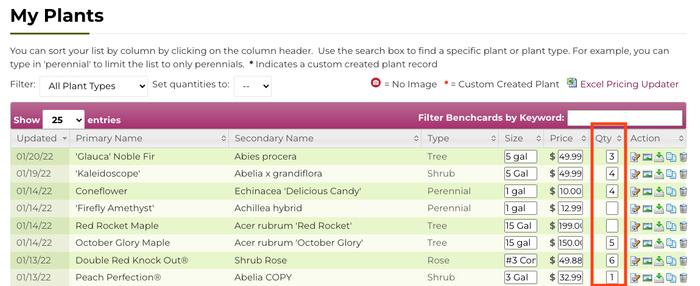
After adding and reviewing plants to your 'My Plants', you enter the number of bench cards (or hangtags or pot labels) you want to download or order in the 'Qty' column. When you have entered all the quantities, click the 'Download/Order' button. You can also use the 'Set Quantities To' option and have all your records have the same Qty to download or order.
Frequently it's due to a slow internet connection or not enough memory in your printer. Be sure to download the file to your computer and print the PDF from your computer vs. printing it from your browser window.
If you are printing via Adobe Acrobat Reader from your computer (and not the browser) and the icons still don't display, your printer may not have enough memory. To test this, create a one page PDF with a single bench card on it. Download that PDF to your computer and open it in Adobe Acrobat Reader (NOT in your browser). Print the single page and see if the icons display. If so, then your printer doesn't have enough memory to print larger PDFs. You may be able to increase the memory in your printer fairly inexpensively.
One other reason the icons may not display is due to an outdated version of your Adobe Reader. You can download the free reader from get.adobe.com/reader/.
The toner is the biggest factor in how long your bench cards will last in the sun. With a high-quality laser printer using the printer manufacturer's toner (not generic or remanufactured cartridges) and printing on our blank sign material, your cards should last 2 to 6 months.
Please be aware that you may need to replace them before the end of your selling season. If your UV is stronger (i.e. more southern states & high altitudes), cards will fade faster. At lower UV levels, however, you will get more life out of your bench cards.
if you print your cards yourself your average cost for a 7"x5" card including the blank sign material and toner is less than 40¢ and the 11"x7" should be less than 80¢. Therefore, replacing cards as needed is not a significant cost.
NOTE: Certain colors like Red, Yellow, Pink, Orange and Cyan fade faster than other colors.
There are PDF readers in all current browsers, but you have more control over printer settings if you download your PDF file and then open it with Adobe Acrobat Reader. You can download the free reader here, https://get.adobe.com/reader/.
Also, if you save the PDF to your computer, you can access it again for printing in the future if you like. Of course, as long as you are a subscriber, you can regenerate downloads for free at any time.
With dry winter air, there can be static in the print material If your printer is in a normal size room with walls (vs. a wide-open space), purchase an inexpensive humidifier. Humidity in the printing room should be at least 40% - do not put the humidifer next to the printer though. We also recommend unboxing the paper and sitting on a shelf.
One More Question?
If you have more questions, send us a message and we will answer you as soon as possible.